
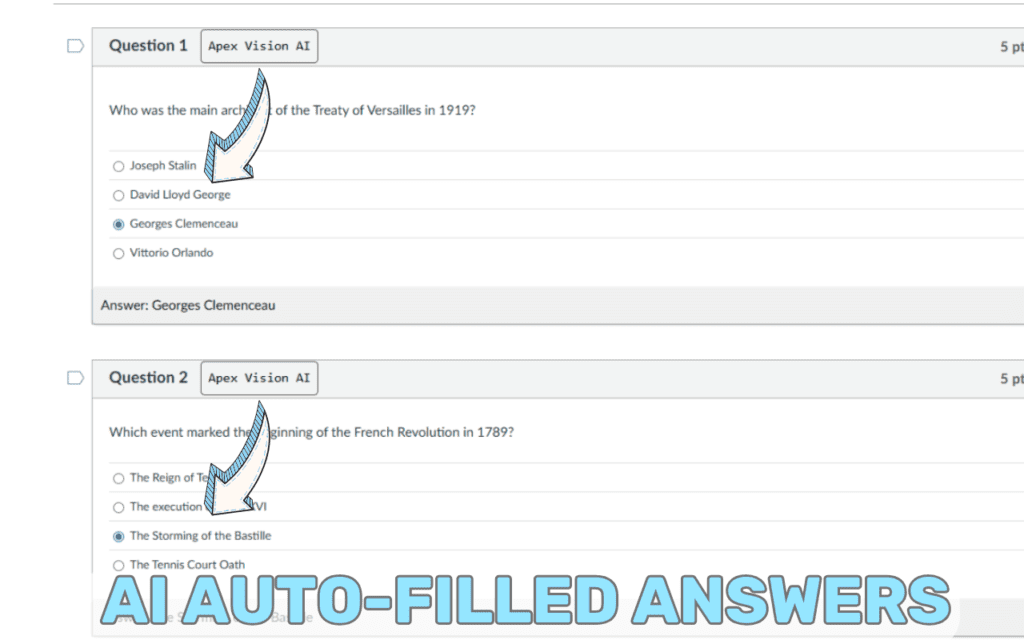
Canvas Quiz Solver & Canvas Quiz Answers with Apex Vision AI
Quick Overview
Canvas quizzes can be stressful under tight deadlines. Apex Vision AI serves as your Canvas Quiz Solver, integrating seamlessly into Canvas to provide instant, accurate Canvas Quiz Answers with concise explanations. You’ll understand concepts as you go, complete quizzes more quickly, and build confidence for future assessments.
Whether you’re tackling multiple-choice questions, text prompts, or image-based problems, Apex Vision AI adapts to your needs—use the toolbar, pop-up panel, on-screen buttons, side panel, or image solver, whichever fits your workflow best. For a quick walkthrough, see “How It Works in Canvas” or watch our Canvas YouTube demo.
How Students Get Canvas Quiz Answers: Traditional vs. Apex Vision AI
| Method | Time per Question | Accuracy | Ease of Use |
|---|---|---|---|
| Manual Google Search | 3-8 minutes | 65-75% | Low (tab switching) |
| Chegg/Course Hero | 2-5 minutes | 70-80% | Medium (subscription required) |
| Study Group Chat | 5-15 minutes | 60-75% | Low (wait for replies) |
|
⭐ BEST CHOICE
Apex Vision AI
|
2-5 seconds
⚡ 60x faster
|
90%+ |
High
Works directly in Canvas
|
Why Students Choose Apex Vision AI for Canvas Quizzes
Lightning Fast
Get answers in 2-5 seconds without leaving Canvas—no tab switching or searching
Canvas-Native Integration
Works seamlessly within Canvas interface with multiple access methods
Detailed Explanations
Every answer includes step-by-step explanations to help you learn
Image & Diagram Support
Solve visual problems, graphs, equations, and screenshots instantly
Ready to ace your Canvas quizzes? Install Apex Vision AI free and complete your next quiz in record time. Get Started Free →
How It Works in Canvas
How It Works in Canvas
Canvas Extension Pop-Up
Activate the AI pop-up on your Canvas quiz page with one click. It reads questions on-screen and returns instant Canvas quiz answers plus concise explanations to reinforce learning.
Instant Assistance Buttons
On-screen buttons appear next to each Canvas question, acting as a Canvas Quiz Solver. Click to retrieve AI-generated answers instantly.
CTRL+SHIFT+X to hide buttons/answers
Canvas Side Panel
Open the side panel while on any Canvas page. Submit text or image snippets to get Canvas quiz answers, explanations, and study tips without leaving your workflow.
Canvas Toolbar
Use the toolbar icon on Canvas pages to invoke AI help discreetly. Acts like a Canvas Quiz Solver in the background, delivering quick answers without switching tabs.
CTRL+Q on Windows
CTRL+SHIFT+Y to Hide/Unhide
AI Image Solver
Upload or screenshot diagrams, equations, or screenshots from Canvas quizzes. The AI image solver analyzes and returns step-by-step Canvas quiz answers for visual problems.
CTRL+SHIFT+Z to Activate Image Analysis
One-Click Study Guides
Generate concise study guides from Canvas quiz topics and explanations. Reinforce concepts discovered while solving Canvas quizzes.
Table of Contents
Key Features
Native Canvas Integration
No tab switching: AI runs inline on your Canvas page, reading questions and displaying answers immediately.
Instant Autofill
One click fills multiple-choice answers. Perfect for timed Canvas quizzes when every second counts.
Image & Diagram Solver
Upload or screenshot visuals—equations, charts, drawings—and get clear, step-by-step Canvas quiz answers.
Discreet Operation
Behaves like a human user to avoid detection. Quietly assists you on Canvas.
User-Friendly Controls
Access via toolbar icon, pop-up panel, side panel, or on-screen buttons. Show/hide as needed.
Context-Aware Explanations
Beyond correct answers: concise explanations reinforce concepts after each Canvas quiz.
Benefits
- Save ~30% Study Time: Instant Canvas quiz answers free up hours for deeper review and practice.
- Lower Stress: Reliable AI help reduces anxiety on quiz day; quickly verify answers.
- Learn as You Go: Explanations clarify tricky topics, reinforcing knowledge instead of guessing.
- Higher Confidence & Grades: Consistent accuracy and understanding lead to better performance over time.
- Wide Coverage: Supports math, science, humanities—whatever your Canvas quiz includes.
Student Stories
“I used Apex Vision AI on a tough organic chemistry Canvas quiz—finished 20% faster and truly understood why each answer was right.”
“The autofill feature saved me in a timed psychology test on Canvas. Quick explanations helped me grasp concepts faster for later modules.”
Best Practices & Tips
- Review Explanations: Always read the rationale provided. Create flashcards or notes for long-term retention.
- Combine with Manual Study: Use AI to confirm answers, then practice similar questions manually to test recall.
- Customize Settings: Toggle prompts or on-screen buttons to suit your workflow and avoid distractions.
- Practice First, Verify Later: Try practice quizzes unaided, then use AI to check answers and explanations afterward.
- Stay Ethical: Use insights to deepen understanding. Treat AI as a study aid, not a substitute for learning.
Advanced Tips for Canvas Quiz Success
Elevate your Canvas experience with these advanced strategies:
- Leverage Study Guides Proactively: After initial quiz attempts, generate one-click study guides from missed questions. Use these summaries to focus revision on weak areas.
- Integrate Notes & Flashcards: Export concise explanations into your preferred note-taking app or flashcard tool (e.g., Anki). Reinforce memory by spaced repetition based on AI-provided rationale.
- Time Management: For timed Canvas quizzes, practice under simulated time constraints. Use AI for rapid answer checks post-practice to identify patterns and gaps.
- Customize Prompts: In settings, adjust prompt style (brief vs. detailed) to match question complexity. For advanced topics, request “concise rationale + related concept links” to deepen understanding.
- Batch Review: Compile a list of challenging questions from multiple Canvas quizzes. Use the side panel to process them in batch mode, obtaining grouped explanations for thematic study sessions.
- Troubleshoot Smartly: If a Canvas page changes layout, ensure extension is updated. Check User Guide for platform-specific tips and troubleshooting.
- Privacy & Security: Confirm you’re following institution policies. Review the privacy policy and disable features if needed for compliance.
Frequently Asked Questions
How do I get started?
Install the extension, create a free account, navigate to a Canvas page with a question on screen, then use any available method (toolbar icon, pop-up panel, on-screen buttons, side panel, or image solver) to retrieve an answer—whichever fits your scenario best. Learn how to get started here.
Is Apex Vision AI detectable by Canvas or similar platforms?
No. It’s built to blend discreetly into your browser workflow, minimizing detection risk on Canvas, Blackboard, Moodle, and other LMS. Always follow your institution’s policies.
Can I cancel my subscription anytime?
Yes. You can cancel, upgrade, or downgrade via your account dashboard at any time. Cancelling stops future billing immediately; you retain access until period end.
How accurate are the answers?
Accuracy is high for most question types, with concise explanations to help you verify. It can vary based on question complexity and your subscription tier.
Which platforms does it support?
Integrates seamlessly with Canvas, Blackboard, Moodle, and most web-based LMS or quiz interfaces. Also offers image/diagram analysis for visual problems.
Is my data private?
Questions are processed securely; no personal or quiz data is stored long-term. See the privacy policy for details.
What if a feature doesn’t load?
Check network connectivity and extension version. Refresh the page or reinstall if needed. For platform-specific tips, consult our User Guide or contact support.
Wrap-Up
Canvas quizzes don’t have to feel like hurdles. With Apex Vision AI’s seamless integration as your Canvas Quiz Solver, you receive instant Canvas Quiz Answers and concise explanations that fit your workflow. Install the extension now and start studying smarter!
Why Choose Us?
About Apex Vision AI
Apex Vision AI is developed by a team of edtech experts and AI engineers dedicated to empowering college students. Leveraging the latest AI models and a massive academic library, we deliver instant, accurate quiz and homework assistance, helping students learn more efficiently and confidently. Learn more on our About Us page.
Learn more about How It Works and transform your Canvas quizzes today.