
Best AI for Homework: Complete Guide to Choosing Your AI Study Assistant (2025)
The best AI for homework in 2025 is Apex Vision AI, offering 93% accuracy, instant answers across all learning platforms, and step-by-step explanations that help you actually learn—not just copy answers. With over 1 million questions answered and a 4.9-star rating, it’s the most trusted AI homework helper for students.
Late-night deadlines, surprise quizzes, and an ever-growing reading list—sound familiar? If you’ve searched for the best AI for homework at 2 a.m., you’re not alone. Thousands of students every day look for AI tools that can help them complete assignments faster while actually understanding the material.
This comprehensive guide breaks down what makes an AI tool truly useful for students, why Apex Vision AI consistently outperforms competitors in real-world tests, and how to choose the right AI homework assistant for your specific needs.
Quick Overview
Late-night deadlines, surprise quizzes, and an ever-growing reading list—sound familiar? If you’ve typed “best AI to help with homework” into Google at 2 a.m., you’re not alone. This post breaks down what makes an AI tool truly useful for students, why Apex Vision AI consistently tops real-world tests, and how to get the most learning value out of any AI assistant.
Table of Contents
Why Students Are Turning to AI Right Now
| Pain Point | How AI Fixes It |
|---|---|
| Time Crunch – juggling classes, work, and social life | Instant answers & explanations |
| Information Overload – too many resources, too little clarity | Summarises key steps in plain English |
| Stress & Burnout – endless hours on problem sets | Reduces busywork so you can rest |
Big idea: AI shouldn’t replace learning. It should accelerate it by handling repetitive look-ups and breaking down tough concepts
Must-Have Features in an AI Homework Helper
- Accuracy ≥ 90 % on real assignment questions
- Sub-second speed so you don’t lose focus
- Cross-platform support (Canvas, SmartBooks, Google Forms, PDFs)
- Transparent student pricing—no hidden paywalls during finals week
- Privacy-first policies (no selling your data to ad networks)
How It Works
- Install Free Extension: Add the Apex Vision AI Homework Helper Extension from Chrome Web Store.
- Sign Up Free: Create an account on apexvision.ai to unlock answer features.
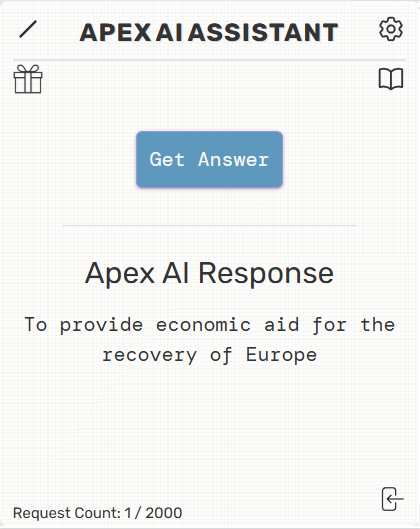
- Click “Get Answer”: Ensure your Smartbook question appears on screen.
- See Instant Answer: Get a precise AI-generated solution with step-by-step explanation. For advanced tips, see the User Guide.
With its user friendly design and advanced AI, Apex Vision AI turns homework into a easy task. You spend less time stuck and more time understanding.
Key Features
Apex Vision AI feels less like an add-on and more like a built-in superpower for your browser. One shortcut → answers appear, no tab-hopping, no stress.
- Instant answers on any site. Press Ctrl + Q (Cmd + Q on Mac) and the right choice drops straight into Canvas, Blackboard, Google Forms—whatever you’re using.
- Step-by-step “Explain Mode.” If you’re stuck, flip a switch and the AI shows every step so you actually learn the concept.
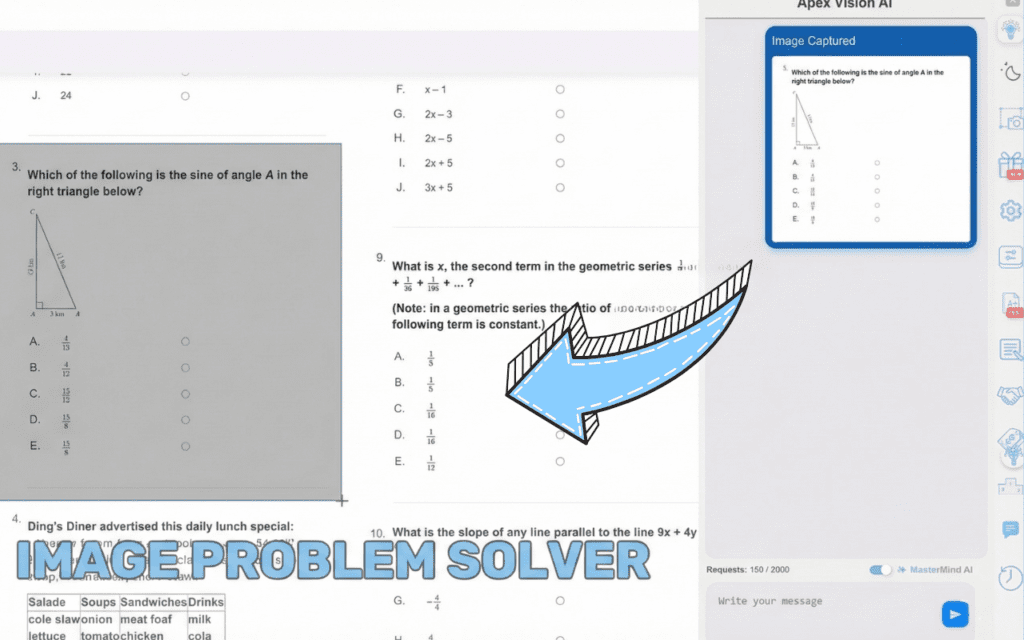
- Graph & Image Solver. Snap a screenshot, upload a photo, or highlight a diagram; the tool decodes visuals as fast as text.
- Stealth Mode. The extension stays invisible until you press a key, so your screen looks normal during proctored sessions.
- One-Click Study Guides. Turn an entire chapter into flash cards and topic summaries in about ten seconds.
- Student pricing that won’t wreck a ramen budget. Plans start at $7.99/month after a free trial, far cheaper than an hourly tutor.
Bottom line: Apex Vision AI rolls the best parts of a tutor, search engine, and note-taking app into a single, privacy-first extension that lets you finish homework faster—and learn more while you’re at it.
Why Choose Apex Vision AI?
Seamless Integration
Operates without changing page layout or drawing attention.
Human-Like Interaction
Emulates natural typing/clicking speeds to blend in.
Platform Safe
Uses advanced methods to avoid detection mechanisms.
Privacy Focused
Maintains anonymity, offering help without exposing identity.
Frequently Asked Questions
Is using an AI homework helper cheating?
Treat it like a tutor: learn the steps, cite the source, follow your honor code.
Will it work on my Chromebook / Mac / PC?
Yes—any desktop Chrome browser. A mobile dashboard lets you paste questions from your phone.
Does it cover essays or only multiple-choice?
Multiple-choice and short-answer are fully supported; an essay-outline beta is rolling out this fall.
Join students who cut homework time by up to 30% while improving grades and understanding.
Why students choose us


Using AI Responsibly—A Mini Guide for Students
- Target weak spots – Don’t blanket-use AI on everything. Focus on concepts you don’t yet grasp.
- Compare explanations – Ask the AI to show alternate methods; this builds critical thinking.
- Cite properly – If you paste AI-generated text into a paper, credit the tool (check your school’s policy).
- Stay within honor codes – Check out our honor code policy here to see your specific schools policy – Apex AI Honor Code
Apex Vision AI streamlines study sessions. Say goodbye to endless searching and hello to clear, instant support. Get started now. For broader context on AI homework helpers, see Apex Vision AI: The Ultimate Chrome Extension for Answering Multiple Choice Questions.
Struggling With Homework & Tests?
The AI Homework Helper Chrome Extension, created by students for students, provides instant and accurate answers for homework, quizzes, and tests, saving time and reducing stress with an easy-to-use interface and instant answers to MCQ’s.
10M+
Questions Answered
100k+
Hours Saved
50k+
Study Sessions
10k+
Happy Students
Technology
Apex Vision AI
Keywords: AI homework helper, AI study assistant, answer AI Chrome extension, Apex Vision AI, AI for multiple-choice questions, homework answer AI,
Time to Read: ~6 minutes