Your cart is currently empty!
How to Get Smartbook Answers: AI Solver Extension for Faster Learning
Smartbook assignments are a time trap. What your professor says takes “30 minutes” somehow turns into 2 hours of frustration, re-reading the same passages, and guessing at answers until you get them right.
If you have ever searched for smartbook answers, you are not alone. Thousands of students every day look for ways to get through McGraw Hill Connect assignments faster. But here is the problem: most “answer sites” are outdated, paywalled, or outright wrong.
That is why we built Apex Vision AI: a Chrome extension that reads your Smartbook questions in real-time and provides instant, accurate answers with explanations. No tab-switching. No copy-pasting. No detection risk.
Skip the Reading, Start Solving
Already know you need help? Try our Smartbook Solver free, right now.
93% Accuracy
Instant Answers
100% Undetectable
How It Works
Table of Contents
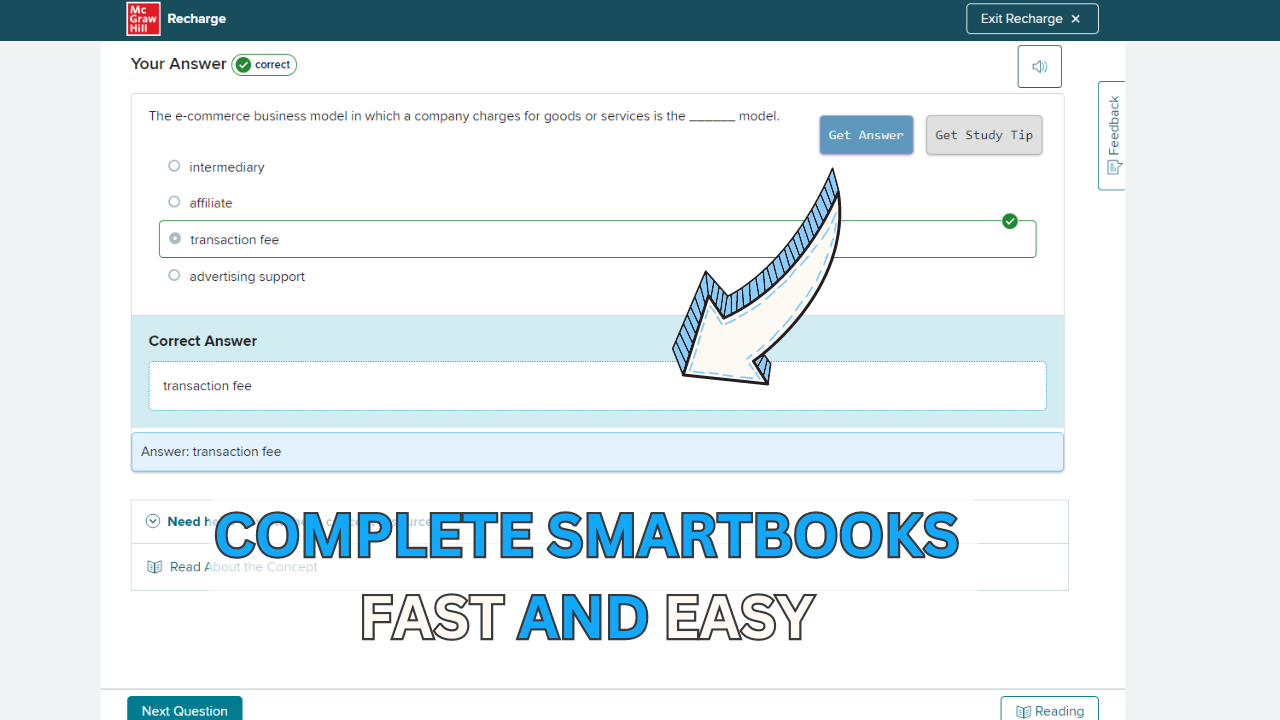
How to Complete SmartBooks Faster
Three Different Ways
Highlight-to-Answer (≈1 ½ s)
- Select question text.
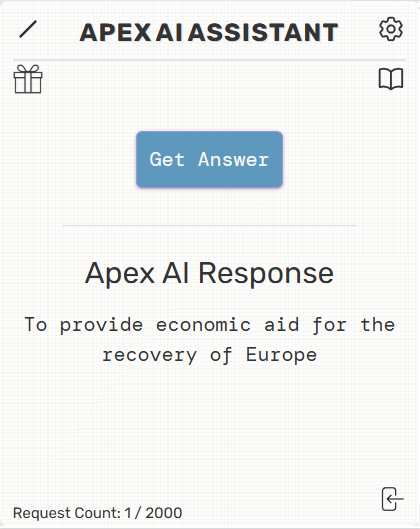
- Click Get Answer Pop Up.
- Apex AI provides the most accurate solution.
Side-Panel Coach (≈3 s)
- Click the Apex icon on the right edge.
- See full explanation, key formulas & chat history.
- Hit “Add to Study Guide” for later review.
Image Analysis (≈3 s)
- Press Ctrl + Shift + Z.
- Drag over a graph or photo.
- Apex decodes & explains the visual.
Getting Started in 4 Simple Steps
- Install Free Extension: Add the Apex Vision AI Homework Helper Extension from Chrome Web Store.
- Sign Up Free: Create an account on apexvision.ai to unlock answer features.
- Click “Get Answer”: Ensure your Smartbook question appears on screen.
- See Instant Answer: Get a precise AI-generated solution with step-by-step explanation. For advanced tips, see the User Guide.
How to Get Smartbook Answers Instantly
Students searching for smartbook answers often waste hours trying different methods. Whether you’re looking for how to get smartbook answers quickly or need reliable solutions for McGraw Hill Connect assignments, understanding the most effective approach saves valuable study time.
The traditional approach—manually searching each question, checking multiple websites, or copying text into ChatGPT—is slow and often produces inaccurate results. Here’s why students struggle:
- Time-consuming searches: Switching between tabs breaks your focus and wastes 5-10 minutes per question
- Inaccurate answers: Generic AI tools lack context for specific Smartbook questions
- Copy-paste limitations: Many Smartbook questions can’t be copied, making traditional methods impossible
- No explanations: Finding an answer without understanding why it’s correct doesn’t help you learn
The Smart Solution for Smartbook Answers
Apex Vision AI solves these problems by providing smartbook answers directly on your screen—no tab switching, no copy-pasting, no guesswork. Here’s what makes it different:
Traditional Methods vs. Apex Vision AI
| Method | Time per Question | Accuracy | Learning Value |
|---|---|---|---|
| Manual Google Search | 5-10 minutes | 60-70% | Low (no context) |
| Generic ChatGPT | 3-5 minutes | 70-80% | Medium (generic) |
| Chegg/Course Hero | 2-4 minutes | 75-85% | Low (outdated) |
|
⭐ BEST CHOICE
Apex Vision AI
|
1-3 seconds
⚡ 100x faster
|
93%+ |
High
Step-by-step explanations
|
Why Students Choose Apex Vision AI for Smartbook Answers
Instant Results
Highlight any question and get answers in under 2 seconds—no waiting, no searching
Context-Aware Accuracy
AI trained on 260M+ scholarly sources understands your specific course material
Learn While You Work
Every answer includes detailed explanations so you understand the concept
Works on Any Question Type
Text, images, graphs, diagrams—even questions you can’t copy-paste
Ready to get smartbook answers instantly? Install Apex Vision AI free and complete your first assignment in half the time. Get Started Free →
With its simple design and advanced AI, Apex Vision AI turns Smart book work into a smoother process. You spend less time stuck and more time understanding.
Why Students Choose Apex Vision AI
93% Accuracy
Powered by GPT-4.1 and 260M scholarly sources, so you can trust every answer.
Instant Answers
Press Ctrl + Q (Cmd on Mac) and watch the correct option auto-fill—under 1 second.
Universal LMS Support
Canvas, Blackboard, Moodle, Google Forms—works anywhere you study online.
Explain Mode
Switch modes to reveal step-by-step reasoning, formulas, and citations so you actually understand.
Graph & Image Solver
Snap a screenshot or photo—Apex decodes graphs, diagrams, and handwritten math just as fast.
Stealth Mode
Stays invisible until you press a key, keeping your screen distraction-free (and proctor-friendly).
1-Click Study Guides
Turn any chapter into flash cards and topic summaries in seconds—perfect for exam week.
Student Pricing
Free trial, then plans from $7.99/mo—cheaper than one tutoring hour.
Bottom line: Apex Vision AI merges tutor, search engine, and note-taking app into one privacy-first extension that helps you finish homework faster—and learn more while you’re at it.
Undetectable Operation
Apex Vision AI works quietly in the background to assist during quizzes. Its methods mimic human typing/clicking speed and avoid altering page layouts, keeping help subtle and safe.
Seamless Integration
Operates without changing page layout or drawing attention.
Human-Like Interaction
Emulates natural typing/clicking speeds to blend in.
Platform Safe
Uses advanced methods to avoid detection mechanisms.
Privacy Focused
Maintains anonymity, offering help without exposing identity.
Smartbook Solver Alternative
Apex Vision AI is more than an answer tool—it’s a study partner. The Smartbook Solver feature helps any student aiming for better grades and less busywork.
| Aspect | Improvement |
|---|---|
| ⏱️ Time Management | Less time stuck, more time reviewing key ideas. |
| 📈 Learning Efficiency | Instant, precise answers let you focus on understanding. |
| 📚 Study Sessions | Tailored tips and guidance deepen comprehension. |
What Students Think Of Apex Vision AI
With Apex Vision AI’s Smartbook solver, assignments become learning steps. You save time, reduce stress, and build real understanding. To see how it works in detail, learn how our Smartbook solver works and try it yourself.
Join students who cut homework time by up to 30% while improving grades and understanding.
Why students choose us

Xavier Washington
“What a great and indispensable tool to have under your belt! I highly recommend this product!”

Amanda
“Awesome extension—the only one that has given me 100 percent right answers.”

Donovan Smith
“It actually works.”

Catalina R
“It works perfect with different study platforms!”

Preston Cervantes
“Really really useful—pls download. A no-brainer to get AI.”

Moonlight Slimes
“Best extension for the price—no tab-hopping, undetectable, very accurate!”

Matthew Shane Tabamo
“Cool extension bruh, one of the best.”

Kyle Chen
“I finish my homework so much more faster now.”

napple
“very very very very very very awesome”

Andres Cordero
“Very good and got me A in every class.”

Morgan George
“Works well on platforms I can’t copy-paste.”

Jazmine Carter
“Helps me a lot with health science homework—better than Coursology.”

Rishabh Yadav
“Perfect for my quick test-problems!”

Mariam Karasneh
“Works great! Very convenient and accurate.”

Isaiah Brooks
“This extension actually works!!”
Marcus Smith
“Greatest app since Facebook!!!!!!”

Jenna Davis
“Amazing!”

Kristine
“This is awesome to help you through long assignments.”

Reed Latimer
“Awesome product.”

Reizirth
“It works and I really enjoyed this a lot!”

Ryan Miloudi
“Super awesome platform.”

Armon Tay
“Very accurate.”
FAQ
What is a Smartbook solver extension?
It’s a browser extension that uses AI to read Smartbook questions and provide instant answers plus clear explanations, helping you learn as you complete assignments.
Is Apex Vision AI safe to use with Smartbook assignments?
Yes. Apex Vision AI mimics human interactions and works quietly without altering page layouts. However, follow your institution’s policies when using tools.
How much time can I save using the Smartbook solver?
Many students report saving around 30% of homework time by getting quick, accurate answers and explanations that help avoid repeated confusion.
How do I get smartbook answers with Apex Vision AI?
Simply highlight any Smartbook question text and press Ctrl+Q (or Cmd+Q on Mac). Apex Vision AI instantly provides the correct answer with a detailed explanation. For image-based questions, press Ctrl+Shift+Z and drag over the question to get answers for graphs, diagrams, or photos.
How do I get started?
Install the extension from Chrome Web Store, sign up free on apexvision.ai, then click “Get Answer” when your Smartbook question appears.
Get Started Today
Ready to Finish Your Smartbook in Half the Time?
Join thousands of students who are already using Apex Vision AI to get instant, accurate Smartbook answers with explanations that actually help you learn.
93%
Accuracy Rate
<1s
Answer Speed
100%
Undetectable